



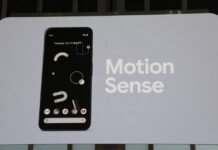

Google broadening motion assist to other devices. Google is release another Android feature to help fights Motion Sickness. The feature had already been introduced on Pixel phones, it is designed to help the eyes and minimize the motion sickness.
This feature was initially introduced with the September Android update from Google but is now being sent out to a larger bunch of Android 17 phones. Motion Assist can be on any Android 17 device, not just Google’s own Pixel devices.
How Google Motion Assist Works
If the information received by the eye, does not correspond with what the balance system in the body detects, then one can experience motion sickness. An example of this would be staring down at your mobile while being a passenger in a moving car.
To ease this effect, Google Motion Assist employs a subtle bubble or shape overlay that appears along the edges of the screen. The overlay features shapes that respond to the vehicle motion, providing a clear visual cue that could help bridge the mismatch between the eyes and the body.
No external third-party app has to be installed by users for this feature, as it is integrated into Android using Google Play services, allowing Google to extend its availability via OS updates and service modules.
Moving Beyond Pixel Phones
In the first instances, Motion Assist started arriving on Android 17. This was now being rolled out to other devices that weren’t Pixel hardware, and Samsung Galaxy phones also were amongst those to have it.
From September reports have been that Motion Assist is appearing on Pixel phones and Samsung phones running Android 17. While it is widely available, it can still vary given phone, Android version and the rollout of Google Play services, so not every compatible phone will be getting it right away.
This is important since it transforms Motion Assist from Pixel-only feature to an Android-wide feature. Google may roll it out on many more smartphones without relying on manufacturers to develop their own motion-sickiness system.
Users Can Customize the Visual Effect
Google has provided many options for customizing Motion Assist. Shapes can be changed to a number of different colours, shapes can be changed and their opacity altered. There is also a play button that repeats colors and shapes.
It is possible to activate this feature manually using Quick Settings so that it is turned on when entering a vehicle. It is also possible to set Android so that Motion Assist will automatically start when movement has been detected by the vehicle.
When activated the visualizations are displayed to the sides of the screen instead of the entire screen, so the user can view their content while perceiving visual information about the motion of the vehicle through the moving shapes.

